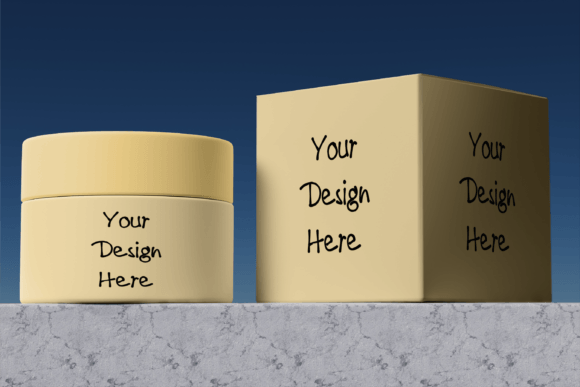
Cosmetics Box Mock-up, Editable Mockup
Cosmetics Box Mock‑up: The Ultimate Editable Photoshop Asset
When you’re launching a new fragrance, lip gloss line, or skincare range, first impressions matter. A flawless Cosmetics Box Mock‑up lets you showcase your brand in high‑resolution, photorealistic detail—without the cost of physical prototypes. Whether you’re a designer, marketer, or e‑commerce entrepreneur, this mock‑up gives you instant visual power with a few clicks.
# Features That Set It Apart
- High‑Resolution Photorealism: 300 dpi files crisp enough for print and web.
- Smart Object Layers: Edit your logo, tagline, or product image directly inside Photoshop.
- Changeable Card Color: Quickly switch background hues to match seasonal palettes or brand updates.
- Transparent Backgrounds: Layer your mock‑up over any scene or mock‑up background.
# What You’ll Get
The download includes a single Photoshop PSD file** with a fully labeled smart‑object layer—ready for instant customization.
# How To Use It – Step By Step
- Open the PSD in Photoshop.
- Double‑click the smart‑object layer icon to open a new tab.
- Drag and drop your artwork or brand assets into the smart object.
- Save and close the tab; the main mock‑up updates instantly, preserving the correct proportions.
- Adjust the card color by selecting the fill layer or using the color picker.
That’s it! In under a minute you’ll have a polished, ready‑to‑share presentation that looks like a real product box.
# Why This Mock‑up Is a Must‑Have for Your Workflow
• Time‑Saving: No need to shoot additional photos or wait for a print run. • Versatile: Works for brochures, social media, online store showcases, or investor decks. • SEO‑Friendly: When you upload this high‑quality mock‑up to your site or portfolio, search engines love the clear, professional visuals.
Elevate your cosmetic branding with this editable, photorealistic mock‑up and turn every design into a visual story that sells. Enjoy creating!
📚 You Might Also Like

Commercial License Included