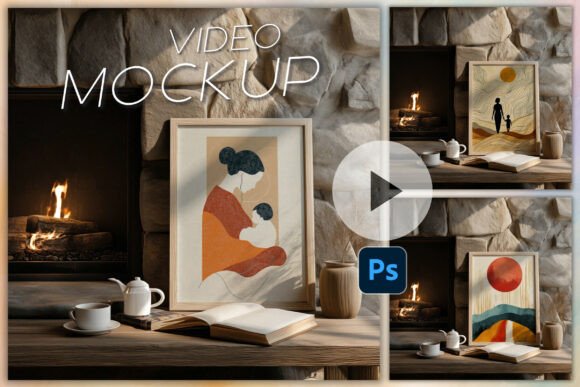
Frame Mockup Animation PSD Smart Object
Frame Mockup Animation PSD Smart Object – A Game Changer for Your Design Workflow
Imagine showcasing your video content in a sleek, professional frame without spending hours on layout or coding. The Frame Mockup Animation PSD Smart Object delivers exactly that, blending simplicity with stunning visual impact. Whether you’re a graphic designer, a marketing specialist, or a content creator, this mockup will elevate your presentations in seconds.
What You Get (and Why It Matters)
- 1 PSD Video Frame Mockup: A high‑quality Photoshop file that appears as a 10‑second animated video frame. Perfect for video promos, app previews, or social media teasers.
- PDF Documentation: All necessary links and quick‑start instructions are neatly packaged in PDF format, ensuring you can dive straight into the creative process.
- Step‑by‑Step Video Tutorial: A concise, beginner‑friendly video that walks you through working with the PSD mockup in Photoshop. No prior animation experience needed.
Why This Mockup Is a Must‑Have
- Lightning‑Fast Setup: Drop your footage into the smart object, hit play, and watch your video come to life in the mockup. No complicated code, no tedious rendering.
- Built for Photoshop: Fully optimized for Photoshop CS6 and newer desktop versions. Seamless integration means you won’t run into compatibility headaches.
- 10‑Second Animation: The built‑in animation keeps viewers engaged while preserving the frame’s elegance. Ideal for short social clips, ads, or demo reels.
- Non‑Standard Ratio Flexibility: The slight deviation from standard ratios is a deliberate design choice, giving your videos a unique, contemporary look that stands out on any platform.
Terms of Use – Clear, Fair, and Business‑Friendly
Feel free to utilize these files for both personal and commercial projects. However, you’re not allowed to resell, redistribute, or embed them into other digital products or templates without express permission. This ensures the creator’s integrity while giving you creative freedom.
How to Get the Most Out of Your Mockup
- Open the PSD in Photoshop CS6+ and double‑click the smart object layer.
- Replace the placeholder footage with your own video file.
- Save and close the smart object – the frame automatically updates.
- Export your final animation using Photoshop’s built‑in rendering options.
With the Frame Mockup Animation PSD Smart Object, you can produce polished, animated frames in a fraction of the time it would take using traditional methods. Transform your video presentations, amplify brand consistency, and impress clients—all while saving precious hours. Get your mockup today and take the first step toward a more dynamic visual portfolio!
📚 You Might Also Like

Commercial License Included