Garden Flag Mockup PSD File | Floral
Garden Flag Mockup PSD File – Floral Edition: A Designer’s Dream
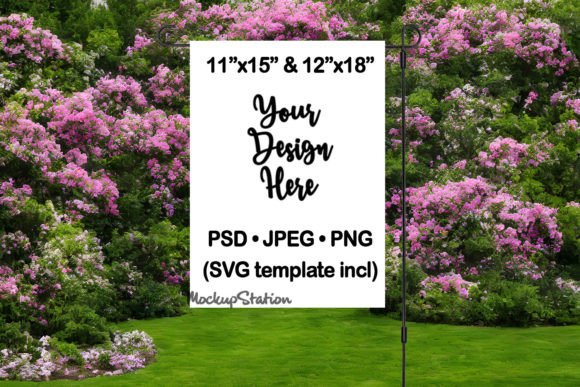
Looking for a high‑impact garden flag mockup that lets you showcase your designs in a vibrant, realistic setting? The Garden Flag Mockup PSD File | Floral delivers exactly that—plus a suite of bonus assets that make customizing a breeze. Whether you’re a freelance graphic designer, a small‑business owner, or a hobbyist creating yard décor, this template is built to save time, boost creativity, and impress clients.
What’s Inside the Download?
- 2 fully‑editable PSD files – layered, smart‑object ready for Photoshop, GIMP, or any compatible editor.
- 4 high‑resolution PNG files – perfect for quick previews or instant social‑media posts.
- 4 high‑resolution JPEG files – ideal for portfolio showcases and client presentations.
- 2 SVG flag templates (11″x15″ & 12″x18″) – ready for sublimation, laser cutting, or vinyl printing.
- Two resolution options for each mockup:
- 3567 × 3000 px – crisp, print‑ready detail.
- 1500 × 1000 px – lightweight for web use.
- Both flag sizes (11″x15″ & 12″x18″) are included in every resolution, so you can switch between dimensions without re‑building the scene.
Why This Mockup Stands Out
- Zero watermarks or logos – the final images are clean and ready for commercial use.
- Smart Object workflow – simply drag‑and‑drop your PNG design onto the flag layer; the mockup updates instantly.
- Realistic yard setting – the floral background adds a fresh, seasonal feel that enhances any design.
- Versatile file formats – PNG, JPEG, and SVG give you flexibility across digital, print, and promotional channels.
- Optimized for SEO – high‑resolution images with proper naming conventions improve search visibility for your portfolio pages.
How to Use It (In 3 Simple Steps)
Step 1: Open the PSD file in Photoshop (or GIMP) and locate the smart‑object layer labeled “Your Design Here.”
Step 2: Replace the placeholder with your own PNG or JPEG artwork. The flag automatically adjusts to the selected size (11″x15″ or 12″x18″).
Step 3: Save or export the mockup as PNG/JPEG for web use, or keep the PSD for future edits. Use the SVG templates for production‑ready sublimation files.
Perfect For:
- Custom garden‑flag designers
- Seasonal marketing campaigns (Spring, Summer, Holiday)
- E‑commerce product listings on Etsy, Shopify, Amazon
- Social‑media promos and Pinterest pins
- Portfolio showcases for graphic design freelancers
Ready to elevate your yard‑decor designs? Download the Garden Flag Mockup PSD File – Floral today and start turning your creative concepts into eye‑catching, market‑ready visuals!
```
📚 You Might Also Like
Commercial License Included