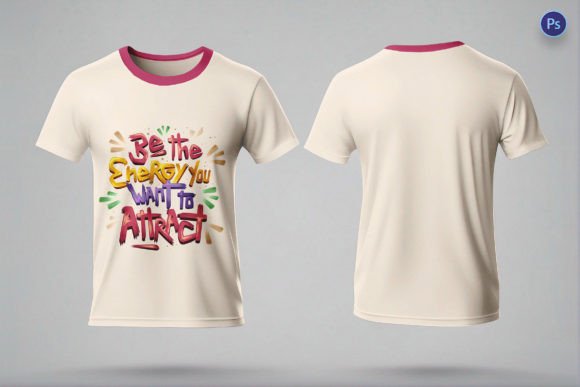
T-shirt PSD Mockup Front and Back
Why the “T‑shirt PSD Mockup Front and Back” Is a Must‑Have for Designers
If you’re looking for a professional‑grade mockup that showcases your artwork on a garment from every angle, the T‑shirt PSD Mockup Front and Back delivers exactly that. This template isn’t just a pretty visual—it’s a practical tool that speeds up decision‑making, sharpens visual communication, and boosts the impact of client presentations.
Key Features That Set This Mockup Apart
- PSD Format with Full Compatibility – Built in Photoshop’s native PSD format, it works seamlessly with Photoshop, GIMP, Affinity Photo, and any software that supports layered PSD files.
- Layered Design for Maximum Flexibility – Every element (front design, back design, shadows, highlights, background) lives on its own layer, making it effortless to replace placeholders or tweak individual components.
- High‑Resolution Output – Rendered at 300 dpi, the mockup stays razor‑sharp even when zoomed in, ensuring your clients see every stitch, texture, and color nuance.
- Smart Objects Integration – Drop your artwork into a smart‑object layer and watch it automatically conform to the shirt’s folds, seams, and perspective for a truly realistic look.
- Realistic Lighting & Shadows – Pre‑crafted lighting and shadow effects add depth and authenticity, giving the impression that the shirt is lit in a professional studio.
- Front & Back Views – Showcasing both sides in one file helps you present a complete brand story without juggling multiple mockups.
How This Mockup Improves Your Workflow
Designers and businesses alike benefit from faster turnaround times. Instead of recreating a scene from scratch, simply open the PSD, replace the smart‑object layers with your design, and export. The result is a polished, high‑impact visual that can be used for:
- Client pitches and approval decks
- E‑commerce product listings
- Social media teasers and ads
- Print catalogs and lookbooks
SEO‑Friendly Tips for Using This Mockup
To get the most out of the T‑shirt PSD Mockup Front and Back in search engines, follow these quick SEO tricks:
- Rename the exported image file with descriptive keywords (e.g.,
custom‑logo‑tshirt‑front‑back‑mockup.jpg). - Include alt text that mentions “t‑shirt mockup front and back” and your brand name.
- Add a concise, keyword‑rich caption below the image on your website or portfolio page.
- Link back to the mockup source or product page using anchor text like “download T‑shirt PSD mockup”.
Final Verdict
The T‑shirt PSD Mockup Front and Back packs all the essential features—high resolution, smart objects, realistic lighting, and dual‑view capability—into a single, easy‑to‑use file. Whether you’re a freelance designer, a branding agency, or a merch‑focused business, this mockup will elevate your presentations, reduce revision cycles, and help you land more sales.
Ready to transform your designs into market‑ready visuals? Download the mockup now and watch your concepts come to life on both sides of the shirt!
```
📚 You Might Also Like


Commercial License Included