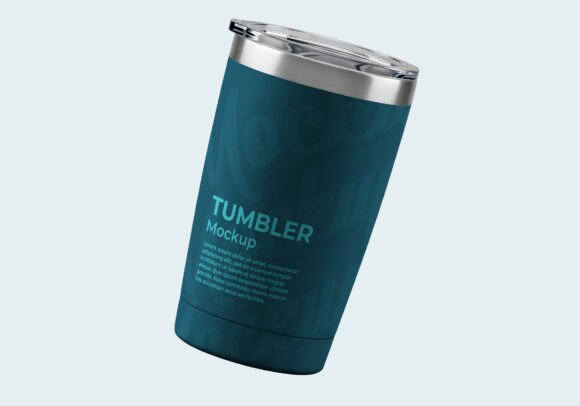
Tumbler Cup PSD Mockup
Tumbler Cup PSD Mockup – A Designer’s Dream Come True
If you’re looking for a high‑impact visual tool to showcase logos, branding, or packaging on a sleek insulated tumbler, the Tumbler Cup PSD Mockup is exactly what you need. This premium mockup blends photorealistic lighting, texture, and perspective, making your designs pop instantly on websites, presentations, and e‑commerce listings.
Why This Mockup Stands Out
- Ultra‑realistic rendering: Advanced shading and reflections give the tumbler a lifelike glass‑like finish.
- Easy Smart Object workflow: Open the PSD, double‑click the “Mockup Up Here” layer, drop in your artwork, save, and watch it magically conform to the cup’s curvature.
- Versatile usage: Ideal for branding presentations, merchandise catalogs, promotional product mock‑ups, and high‑conversion e‑commerce product pages.
- Editable layers & masks: Full control over background, shadows, and reflections so you can match any brand palette.
- High resolution: 300 dpi, perfect for both web and print collateral.
How to Use the Mockup in 3 Simple Steps
Step 1 – Open the file: Launch the PSD in Photoshop and locate the layer named “Mockup Up Here.”
Step 2 – Insert your design: Double‑click the Smart Object thumbnail, paste or place your logo/packaging artwork, adjust size, and save.
Step 3 – Final touches: Return to the main document, and your design will instantly appear on the tumbler with perfect lighting and perspective. Add optional background or text layers to complete the presentation.
Perfect For
- Brand identity proposals
- Online store product images
- Print catalogs and lookbooks
- Social media ads and carousel posts
- Client pitch decks
Upgrade your design workflow today with the Tumbler Cup PSD Mockup and turn any concept into a polished, market‑ready visual that sells.
```
📚 You Might Also Like

Commercial License Included