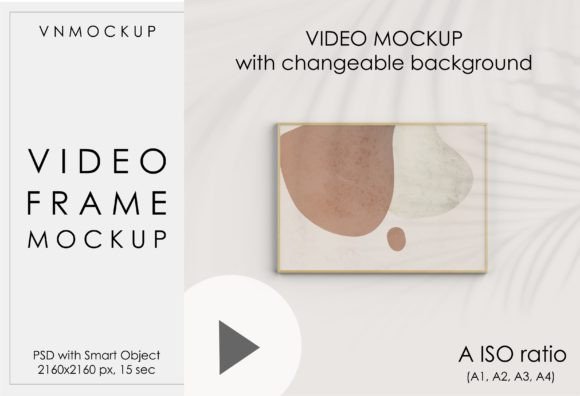
Video Frame Mockup, Horizontal Frame
Video Frame Mockup – Horizontal Frame Review
Looking for a slick, ready‑to‑use mockup that lets you showcase your video content in a stylish horizontal frame? The Video Frame Mockup, Horizontal Frame delivers exactly that—an ultra‑smooth animated Photoshop template that turns any clip into a professional‑grade presentation in seconds. Below we break down why this mockup is a must‑have for designers, marketers, and content creators.
Why This Mockup Stands Out
- Instant Download & No Physical Shipping – Get the PSD and linked MP4 files immediately after purchase. No waiting, no hassle.
- Full Smart Object Control – Replace your video with just a few clicks. The smart object workflow lets you edit the clip, adjust shadow intensity, scale the frame, or change the background without touching the core file.
- High‑Resolution Output – 2160 × 2160 px canvas ensures crystal‑clear results on any platform, from Instagram reels to high‑end client presentations.
- 15‑Second Looping Animation – The built‑in MP4 runs a smooth 15‑second loop, perfect for portfolio reels, website headers, or social media teasers.
- Fully Editable Timeline – Need a still image? Use the Timeline panel to export a JPG at any frame, giving you flexible content options.
What You Get
- ✅ PSD video mockup file with Smart Object (2160 × 2160 px)
- ✅ Linked MP4 video (15 sec, loop ready)
- ✅ Detailed PDF guide with download link and setup steps
- ✅ Unlimited edits – shadow, frame scale, background color, and more
Step‑by‑Step Setup (Quick & Easy)
- 1️⃣ Open the PDF you receive after purchase and follow the link to download the zip folder.
- 2️⃣ Unpack the folder – keep the MP4 in the same location as the PSD (the two files are linked).
- 3️⃣ Open the PSD. If the video doesn’t load, simply Replace Footage with your own clip.
- 4️⃣ Double‑click the Smart Object layer, drop in your artwork or video, save, and close.
- 5️⃣ Adjust shadow intensity, frame scale, or background color in the PSD if desired.
- 6️⃣ Export:
File → Export → Render Video→ choose settings → render.
How to Export a Still JPG
- Open
Window → Timelineand pause on the frame you want. - Go to
File → Export → Export As. - Select JPG, set quality, and click Export.
SEO Benefits of Using This Mockup
Embedding a high‑quality video frame mockup on your site boosts page dwell time and user engagement, both key ranking factors for Google. The clean, horizontal layout also aligns with popular search queries such as “horizontal video mockup,” “landscape frame Photoshop mockup,” and “animated video frame PSD.” Adding descriptive alt‑text (e.g., “horizontal video frame mockup with editable smart object”) further improves accessibility and SEO.
Bottom Line
If you need a versatile, instantly editable horizontal video frame that looks premium on any screen, the Video Frame Mockup, Horizontal Frame is the perfect solution. Its smart‑object workflow, high‑resolution canvas, and easy export options make it a time‑saver for professionals and hobbyists alike. Download it today, swap in your footage, and watch your portfolio instantly level up.
```
📚 You Might Also Like

Commercial License Included