Video Vertical Frame | Canva & PSD
```html
Video Vertical Frame | Canva & PSD – A Must‑Have Animated Mockup for Wall Art
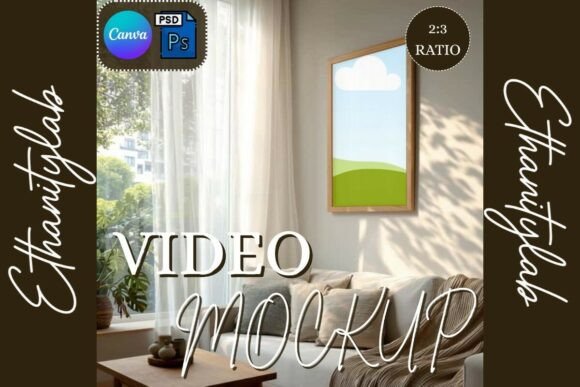
If you’re looking for a sleek way to showcase posters, prints, or digital art, the Video Vertical Frame mockup hits the sweet spot. Combining a realistic vertical wall frame with gently swaying curtains, this animated template adds a touch of lifestyle elegance that makes any design pop.
What’s Inside?
- 1 × Video Mockup – Canva smart frame (ready‑to‑drop link)
- 1 × Video Mockup – Photoshop PSD with smart objects
- Vertical wall frame + animated curtains (high‑resolution, smooth animation)
- Short video tutorial for both Canva and Photoshop
Why Designers Love This Mockup
- Subtle curtain animation with a natural wind effect that adds depth without distracting from your artwork.
- Vertical format perfectly suited for posters, wall art, and tall prints.
- Fully compatible with Canva (smart frames) and Photoshop (smart objects) – edit in minutes.
- Drag‑and‑drop simplicity: replace the placeholder, export, and share instantly.
- Creates a lifestyle vibe that grabs attention on Etsy, Shopify, or social media feeds.
How It Works – Quick 2‑Step Process
- Canva: Open the provided link, click the smart frame, drop your design, and export the animated video.
- Photoshop: Open the PSD, double‑click the smart object layer, insert your artwork, save, and render the video.
Ideal Use Cases
- Wall‑art and poster sellers who need a professional showcase video.
- Interior designers presenting mockups in client presentations.
- Digital artists building a portfolio with eye‑catching motion.
- Social media marketers looking for scroll‑stopping reels and TikTok clips.
In short, the Video Vertical Frame | Canva & PSD is a versatile, high‑resolution mockup that blends realistic animation with effortless editing. Boost your product listings, impress clients, and give your designs the cinematic edge they deserve.
```
📚 You Might Also Like

⬇ Check Offer
Commercial License Included