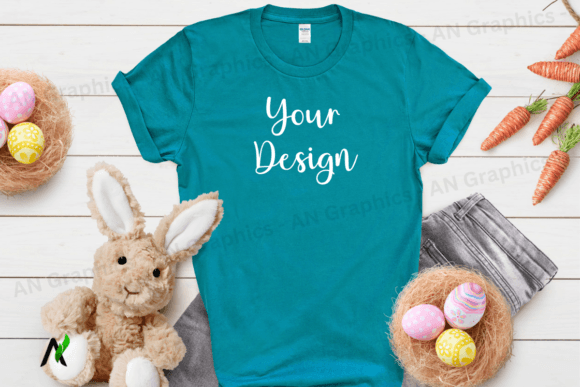
Easter Gildan 64000 Unisex Mockup 062
Easter Gildan 64000 Unisex Mockup 062 – A Must‑Have Tool for Every Designer
When it comes to selling your t‑shirt designs online, presentation is everything. The Easter Gildan 64000 Unisex Mockup 062 in a vibrant Tropical Blue color is the ultimate solution that blends style, convenience, and professionalism. Below, we dive deep into why this high‑resolution mockup is a game‑changer for e‑commerce stores, portfolio showcases, and creative projects.
Key Features at a Glance
- Color & Theme: Easter Theme in eye‑catching Tropical Blue – perfect for spring‑season promotions.
- File Format: High‑resolution JPEG (3000 x 2250 px) with 300 dpi – ready for print or web use.
- Easy Editing: No PSD smart objects – simply drop your design or text onto the image using any photo editing software (Photoshop, Canva, GIMP, etc.).
- Clean and Professional: Logo‑free, watermark‑free, and completely blank canvas – 100 % ready for your brand.
- Versatility: Suitable for product listings, Instagram stories, Pinterest pins, and portfolio galleries.
Why This Mockup Stands Out
1. Ultra‑High Quality – The 300 dpi resolution guarantees crisp details whether you’re printing large banners or uploading to a tiny thumbnail.
2. Simple Workflow – No smart objects or complicated layers. Just open the JPEG, place your design, adjust size, and save. Ideal for artists who want to focus on creativity, not file management.
3. SEO-Friendly Format – Use the same file name structure (“Easter-Gildan-64000-Unisex-Mockup-Tropical-Blue”) to boost search rankings for relevant queries.
4. Time‑Saving Design Tool – With a ready‑made template, you can generate dozens of product shots in minutes, cutting your listing time from hours to seconds.
How to Use the Mockup in Your Workflow
Step‑by‑step instructions to get the most out of this mockup:
- Download the JPEG file from the marketplace.
- Open your preferred editor (Photoshop, Canva, or any photo editor).
- Drag your design file onto the mockup canvas – the island of the t‑shirt is the perfect place to drop your artwork.
- Resize and position the design to match the shirt’s dimensions.
- Save the final image as a high‑quality JPEG or PNG.
- Upload to your store, social media, or portfolio.
Perfect Use Cases
- E‑commerce Stores: Showcase your Easter collection with a professional, ready‑to‑publish look.
- Graphic Design Portfolios: Demonstrate versatility with a clean mockup that highlights your artwork.
- Marketing Campaigns: Create engaging visuals for email newsletters, ads, or social posts.
- Print Shops: Provide clients with an accurate preview of how their designs will appear on a real t‑shirt.
Final Verdict
The Easter Gildan 64000 Unisex Mockup 062 (Tropical Blue) delivers unmatched value with its simplicity, high resolution, and brand‑ready design. Whether you’re a seasoned designer or just starting, this mockup will elevate your product images, save time, and help you stand out in a crowded marketplace. Add it to your creative toolkit today and watch your conversion rates rise!
📚 You Might Also Like

Commercial License Included